
Ralph is an autonomous AI agent loop that runs repeatedly until all PRD items are complete.
📖 README
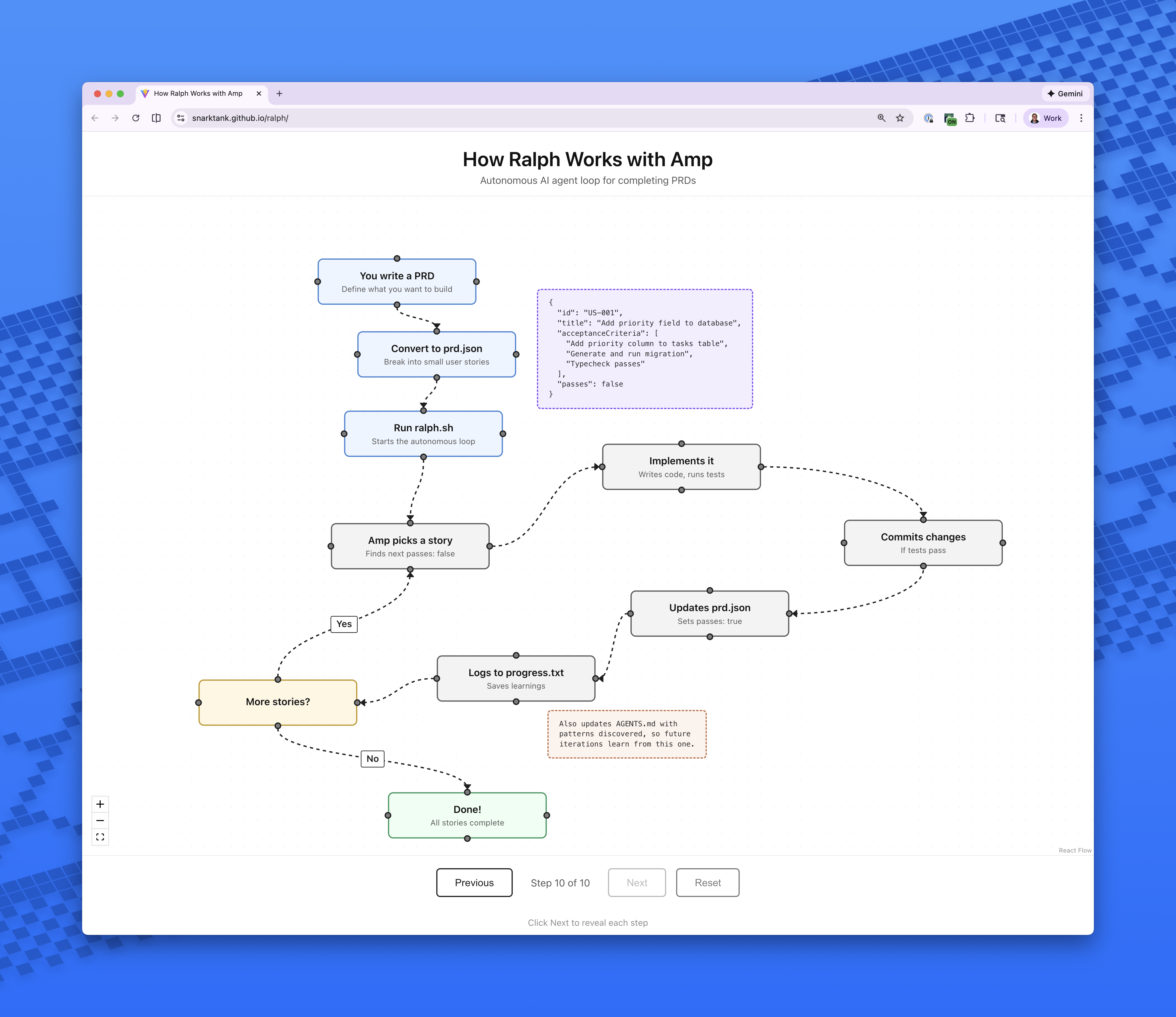
RalphRalph is an autonomous AI agent loop that runs AI coding tools (Amp or Claude Code) repeatedly until all PRD items are complete. Each iteration is a fresh instance with clean context. Memory persists via git history, `progress.txt`, and `prd.json`.Based on Geoffrey Huntley's Ralph pattern.Read my in-depth article on how I use RalphPrerequisites
• One of the following AI coding tools installed and authenticated:
• Amp CLI (default)
• Claude Code (`npm install -g @anthropic-ai/claude-code`)
• `jq` installed (`brew install jq` on macOS)
• A git repository for your projectSetupOption 1: Copy to your projectCopy the ralph files into your project:[代码块]Option 2: Install skills globally (Amp)Copy the skills to your Amp or Claude config for use across all projects:For AMP
[代码块]For Claude Code (manual)
[代码块]Option 3: Use as Claude Code MarketplaceAdd the Ralph marketplace to Claude Code:[代码块]Then install the skills:[代码块]Available skills after installation:
• `/prd` - Generate Product Requir...
📊 Project Info
- Language
- TypeScript
- Stars
- ⭐ 16,503
- Forks
- 1,632
- Today
- +691
- Ranking
- #8
- Collection
- Overall
- Trending Date
- April 13, 2026
- Last Push
- 2/2/2026
📸 Screenshots

5分钟快速开始Ralph
Ralph是一个自主AI智能体循环,通过AI编码工具自动完成产品需求文档条目。
🖥️ OS
macOSWindowsLinux
⚙️ Runtime
Node.js>=14
🔧 Tools
Amp CLI或Claude Code— AI编码工具,用于执行Ralph循环
jq— 处理JSON数据,用于脚本
Git— 版本控制,用于项目管理和内存持久化
📝 Steps
1
安装AI编码工具
选择并安装Amp CLI或Claude Code,确保已认证。
安装Claude Code(如果选择此工具)
$ npm install -g @anthropic-ai/claude-code✓Expected: 工具安装成功,可通过命令行访问。
💡Amp CLI是默认工具,可从官网安装;确保jq已安装(如macOS用brew install jq)。
2
复制Ralph文件到项目
将Ralph文件复制到你的Git项目根目录。
克隆仓库并复制文件到项目
$ git clone https://github.com/snarktank/ralph.git && cp -r ralph/* your-project/✓Expected: 项目目录中出现ralph.sh、prompt.md等文件。
💡确保项目是Git仓库;可手动下载并复制文件。
3
生成PRD并转换为JSON
使用AI工具生成产品需求文档并转换为Ralph格式。
生成PRD(保存为tasks/prd-[feature-name].md)
$ amp /prd 'create a prd for a new feature'转换PRD为prd.json
$ amp /ralph 'convert this prd'✓Expected: 生成prd.json文件,包含用户故事列表。
💡回答AI的澄清问题;确保PRD条目小而具体。
4
运行Ralph循环
执行Ralph脚本开始自动编码循环。
运行Ralph,默认使用Amp工具,10次迭代
$ ./ralph.sh✓Expected: Ralph开始迭代,输出进度,如'Implementing story X'和'Commit successful'。
💡使用--tool claude切换工具;检查prd.json更新和progress.txt记录。
✅ 验证成功
确认Ralph正常运行并完成故事。
- ✓prd.json中所有故事passes: true
- ✓输出COMPLETE消息
- ✓progress.txt有学习记录
⚡ Quick Tips
最佳实践确保每个PRD条目小到能在一个上下文窗口中完成
自定义自定义prompt.md以包含项目特定检查
调试使用git status查看Ralph的提交历史
🔍 Troubleshooting
❓ Ralf脚本权限不足
→ 运行chmod +x ralph.sh
❓ AI工具未认证
→ 按照工具文档进行认证
❓ jq未安装导致错误
→ 安装jq(如macOS用brew install jq)
🎯 Next Steps
1
查看流程图理解工作流程
访问https://snarktank.github.io/ralph/或本地运行flowchart/代码
2
阅读AGENTS.md学习模式
检查更新以优化未来迭代
3
尝试不同AI工具或自定义提示
实验以提高代码质量和效率